
To get students to practice between lessons, write down 1–3 specific practice tasks at the end of every lesson, suggest short daily sessions, involve parents, and use a tool that shows practice time and analysis scores so you can follow up with data at the next lesson.
For private piano, violin, flute and other instrument teachers: your students aren't improving, and you can't tell whether they practice at home. Here is what you can do.
Why don't students practice between lessons?
Students who don't practice are often not lazy. They may not know what to practice, or they get stuck on a hard passage. A Yamaha article for piano teachers notes that some students quit because they don't know how to get past the next hurdle, so teachers need to set clear work between lessons and show students how to practice at home.
Communication is another gap. A survey study at Indiana University of piano teachers, students and parents found that the three groups may not agree on how much practice is expected each week. A teacher may think the message was clear while students and parents heard something different.
Method 1: How specific should practice tasks be?
A practice task should be specific enough that a student knows exactly what to do: which bars, at what tempo, and what "done" looks like. One common approach is to save 2–3 minutes at the end of each lesson to write down 1–3 tasks together with the student.
| Vague task | Specific task |
|---|---|
| "Practice this piece a few more times" | "Bars 9–12 at metronome 60; after 3 clean run-throughs in a row, move up to 72" |
| "Practice scales" | "D major scale, two octaves, 3 times a day; watch the F sharp and C sharp" |
| "Make the rhythm steadier" | "Clap and count the dotted rhythm in bar 5 before playing it" |
Tempo tasks work well with a metronome. See How to Use a Metronome.
Method 2: Does practicing longer or practicing right matter more?
How students practice matters as much as how long. A 2009 piano study by Duke, Simmons and Cash found that the stronger performers did not simply practice longer; they handled mistakes differently, for example stopping as soon as an error appeared and repeating the passage slowly.
So instead of asking for "30 minutes a day", you can teach a simple correction loop:
- Play through once and mark the bars with mistakes.
- Practice only those bars, at a slower tempo.
- After 3 correct repetitions in a row, reconnect them with the bars before and after.
Students can't always hear their own mistakes. MusPal analyzes a student's performance bar by bar and points out pitch, rhythm and dynamics problems, so the student knows which bars to repeat.
Method 3: How can parents help?
Parents don't need to read music to help: they can set a regular practice time, sit and listen, and ask "Which part did you get right today?". A 2017 study by Upitis and colleagues surveyed families taking private music lessons and found that positive teacher–student relationships and parental involvement in practice between lessons were linked to students' enjoyment and progress.
Giving parents one focus point a week, such as "please remind her to use the metronome", is easier to follow than a long homework sheet.
Method 4: How do you know a student really practiced?
Teachers commonly use 3 ways to track practice, and each has limits:
| Method | What the teacher sees | What the student does | Limits |
|---|---|---|---|
| Practice log | Days and minutes the student writes down | Fills in the log after each session | Shows time, not quality; some students may focus on filling the log rather than improving the piece |
| Recordings sent to the teacher | An audio recording | Records and sends it | The teacher has to listen to each one, which takes time with many students |
| MusPal teacher dashboard | Analysis reports, score trends, practice time | Practices with MusPal after scanning the score | The student must first connect with the teacher's referral code |
Practice logs can still help, but if a student feels guilty every week for not filling it in, try checking whether the tasks were completed instead of counting minutes.
Method 5: How can practice data shape the next lesson?
Spending 5 minutes on a student's weekly data before the lesson lets you go straight to the problem instead of listening to the whole piece first. For example:
| What the data shows | What it may mean | What to do next lesson |
|---|---|---|
| Practice time close to 0 | Little or no practice this week | Find out why and cut the tasks down to 1 |
| Scores on one piece stuck at the same level over several attempts | The student is stuck on a specific passage | Open the report, find the bars that keep going wrong, and work only on those |
| A sudden jump in scores | The task worked | Raise the tempo or move on to the next section |
Some teachers make the split explicit: everyday pitch and rhythm correction happens at home with the app, so lesson time can focus on musicality and expression. This also helps parents see why home practice matters.
How does the MusPal teacher dashboard work?
The MusPal teacher dashboard is mainly used on the muspal.com website (it can also be opened in the app under Mine → Settings (top right) → Teacher Portal). Private teachers can see every connected student's practice on one page. Getting started takes 4 steps:
- Download the MusPal app and register a teacher account (you will need an instrumental grade certificate or a music-related degree certificate).
- Log in to muspal.com with your teacher account, find your personal referral code or share link on the home page, and send it to your students or their parents. Once registered, you can join the Teacher Ambassador program.
- Students connect with you by entering the referral code: in the "Teacher Referral Code" field when creating an account on muspal.com, or in the app under Mine → Settings → Connect Teacher Account.
- After students practice and record with MusPal, view their results on the website under Learning Data or Analysis Reports.
| Dashboard area | What you can see |
|---|---|
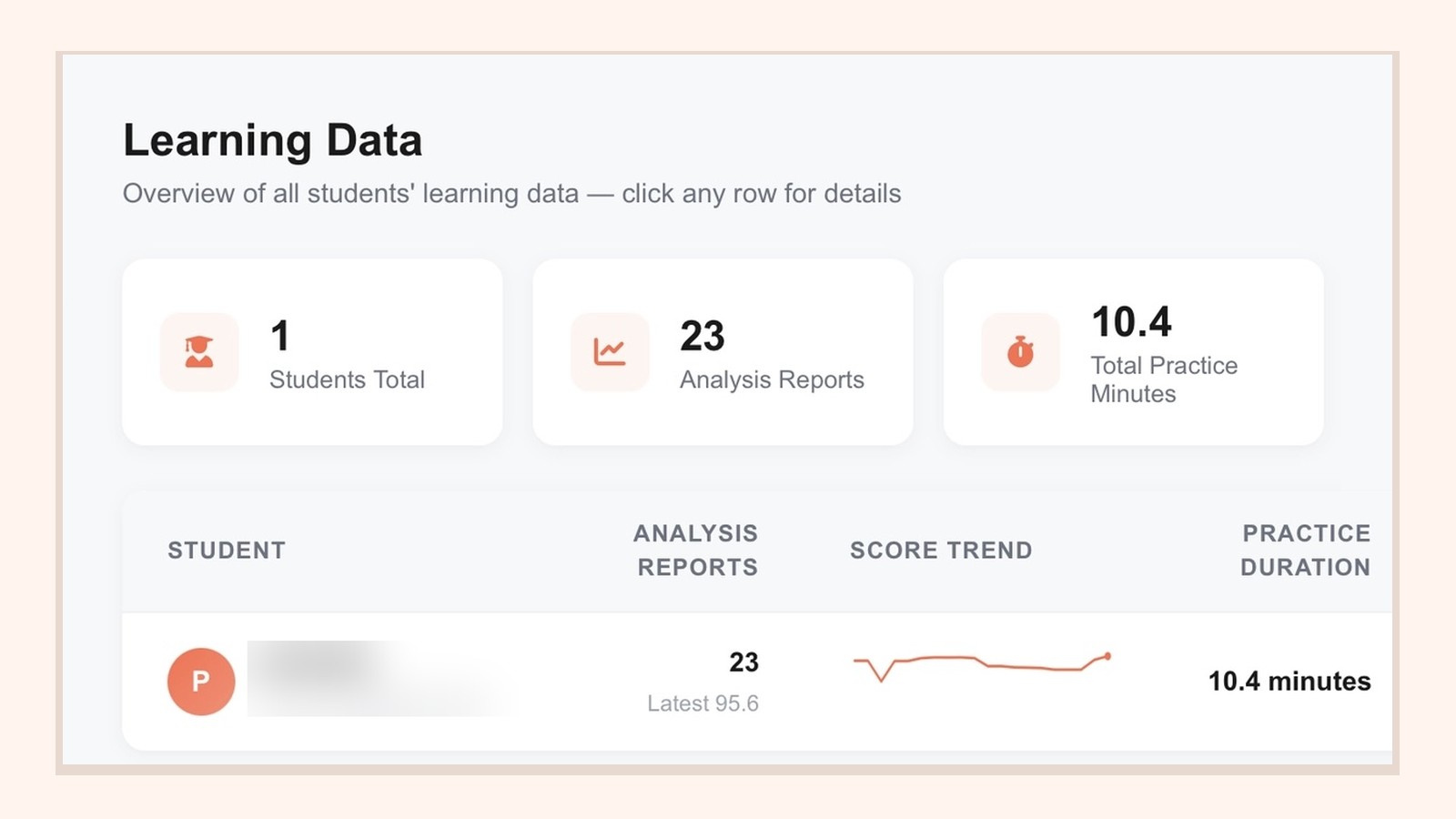
| Learning Data overview | Number of students, number of analysis reports, total practice minutes; for each student: reports, latest score, score trend and practice time |
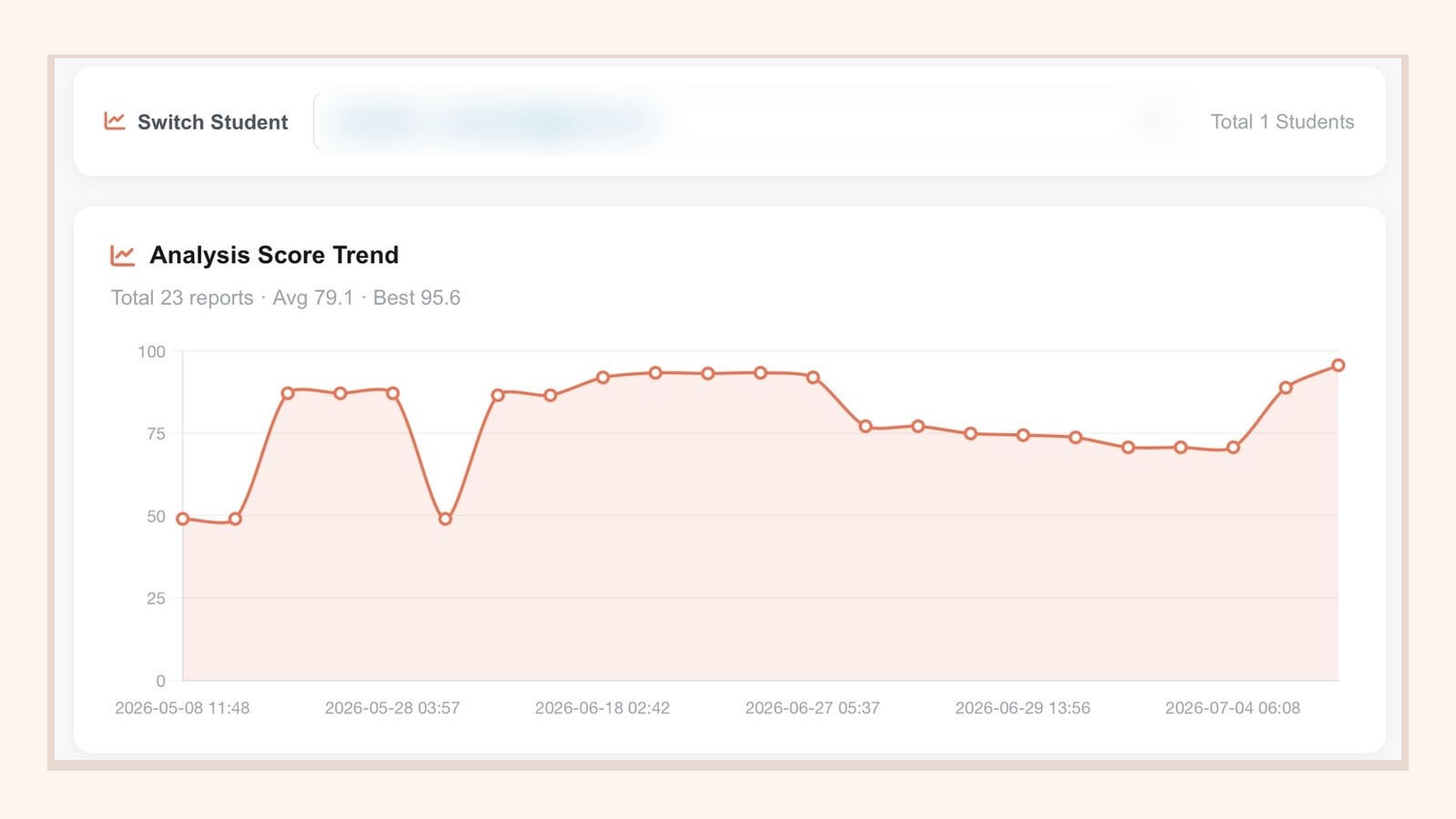
| Individual student page | Analysis score trend chart (average and best score), days in a row scoring 90+, recent activity; tabs for analysis reports, scanned scores and practice time |
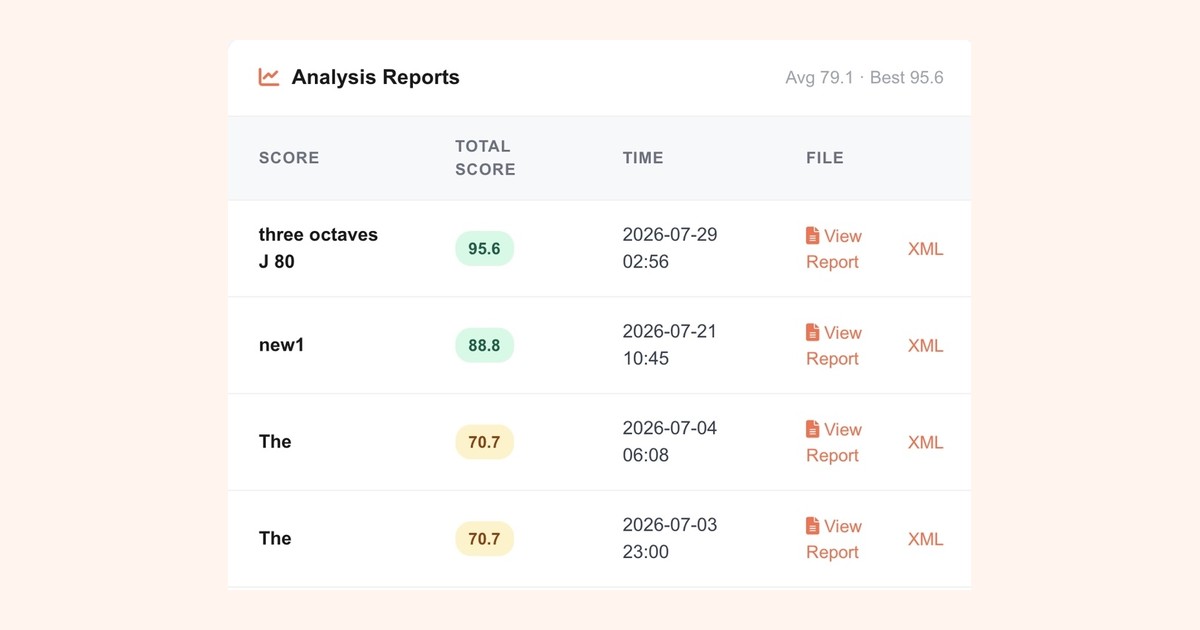
| Analysis report list | Piece, total score and time for each report, with the full report and a downloadable XML score file |
Students only need the regular version. If you run a school, ensemble or music centre and need to set up student accounts in bulk, see MusPal for Education.
To compare features across practice apps, see AI Music Practice Apps Compared.
FAQ
How long should students practice each day? There is no single rule; it depends on age and level. One common approach is to start beginners at 10–15 minutes a day and focus on practicing every day and practicing correctly. For age-by-age suggestions, see How Long Should You Practice Each Day?.
Can teachers see students' analysis reports? Yes. Once a student connects with the teacher's referral code, the teacher can view the student's analysis reports, score trends and practice time in the MusPal teacher dashboard.
Do private teachers need the Education plan? No. The Education plan is only for organizations such as schools, ensembles and music centres. Private teachers use the teacher dashboard, and students use the regular version.
Do private teachers get anything for referring students to MusPal? Yes. The MusPal Teacher Ambassador program lets teachers refer students with a personal referral code and earn commission under the program terms. See the official website for details.
Sources (checked 2026-11-17)
- Yamaha Music: The Teacher's Role in Practice
- Upitis, R. et al. (2017). Parental involvement in children's independent music lessons. Music Education Research, 19(1), 74–98. Link
- Duke, R. A., Simmons, A. L., & Cash, C. D. (2009). It's not how much; it's how: Characteristics of practice behavior and retention of performance skills. Journal of Research in Music Education, 56(4), 310–321.
- Indiana University: Music practice habits: teacher, parent, and student perspectives
Free plan: 3 scans + 3 AI analyses every month